Mastering Midjourney: Beyond Basic Text to Image
Midjourney has fundamentally shifted the way we approach digital art, commercial design, and professional photography. However, to truly harness its generative power, typing a basic conceptual description is rarely enough. The system operates through complex algorithms that respond best to specific structural formatting, styling weights, and technical parameters.
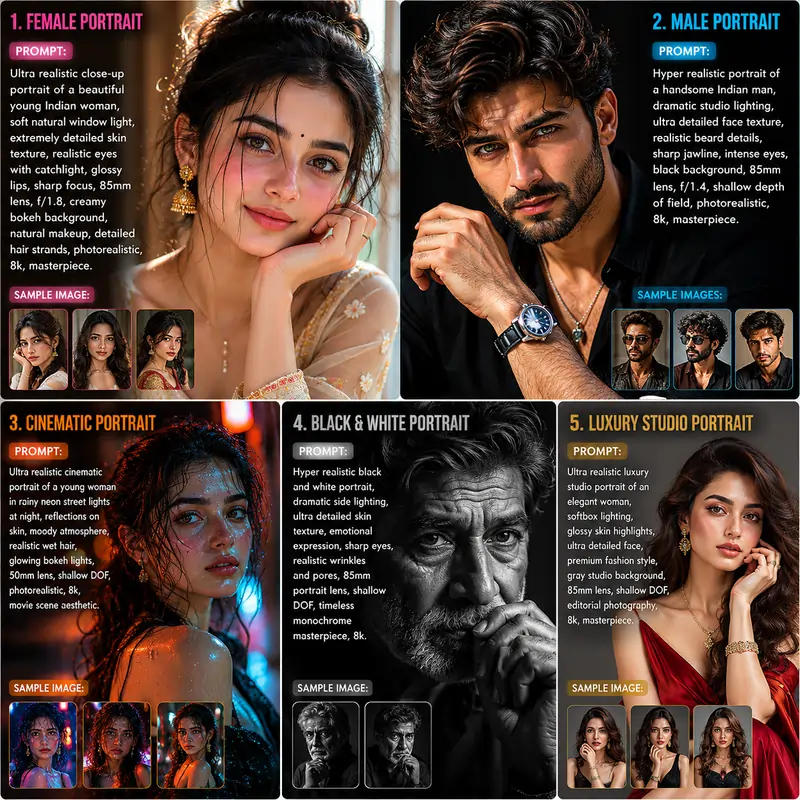
Our library is dedicated to decoding these structures. When users type a simple question like "Write a blog post about SEO," a chatgpt prompt often returns a generic response unless guided properly. The exact same behavior applies to visual generative systems. If you ask for a "beautiful portrait," the machine outputs an over-stylized, cartoonish graphic. Moving away from amateur results requires adopting a systematic framework that explicitly defines composition, lighting physics, camera hardware, and stylistic boundaries.
The Anatomy of an Advanced Midjourney Command
Every professional image generation process follows a strict syntactic sequence. Midjourney breaks down an advanced instructions string into three major pillars: Image URL References, Text Prompts, and System Parameters. Mixing up the order of these pillars or omitting key rendering controls will confuse the system, leading to unexpected styles or severe visual artifacts.
[Image URLs] + [Core Subject Description] + [Environmental & Lighting Style] + [Camera Lens & Hardware Terminology] + [System Parameters (e.g., --ar 16:9 --style raw)]
By following this systematic configuration, you control the image's structure dynamically. Let's break down the technical parameters that allow digital artists to gain predictable results every single time.
Midjourney Technical Parameters Compared
Parameters are engine-level tags that modify how Midjourney computes the core instruction string. They must always appear at the very end of your phrase, separated by double dashes. Knowing how these values interact allows you to fine-tune render complexity effortlessly.
| Parameter | Default Value | Accepted Range | Primary Visual Use Case |
|---|---|---|---|
--ar (Aspect Ratio) |
1:1 | Any ratio (e.g., 16:9, 4:5) | Controls canvas dimensions, framing, and compositional balance. |
--stylize (or --s) |
100 | 0 to 1000 | Low values ensure strict adherence to text; high values increase artistic flair. |
--chaos (or --c) |
0 | 0 to 100 | Controls grid variation. Higher values produce highly unpredictable layouts. |
--weird (or --w) |
0 | 0 to 3000 | Introduces unconventional, quirky, and highly unique styles to the subject. |
--quality (or --q) |
1 | 0.25, 0.5, 1 | Determines rendering time and detail allocation layers. |
Best Midjourney Settings for Ultra-Photorealism
One of the most frequent complaints among digital designers is that human skin look fake, shiny, and computerized. To achieve gallery-quality photorealism, you need to configure your engine defaults using the /settings menu or append specific tags manually. Sometimes, utilizing a specialized gemini prompt generator can provide excellent conceptual inspiration, which you can then refine with technical camera details.
For cinematic realism, always utilize the --style raw parameter. By default, Midjourney applies its own artistic signature, adding saturation and artificial smoothness. The raw modifier bypasses this behavior, forcing the engine to render natural contrast curves, raw shadows, and authentic lighting textures common in documentary photography.
The Lens and Hardware Rule
To eliminate the "AI art look", always specify photographic hardware. For portraits, include "shot on 85mm portrait lens, f/1.8 aperture" to establish an accurate shallow depth of field. For expansive environment art, use "35mm wide-angle lens, cinematic perspective" to balance distortion naturally.
Advanced Character & Style Consistency
For modern commercial production, producing one-off beautiful images is rarely useful; brands demand consistency. Whether you are generating marketing mockups or reviewing google gemini ai photo editing prompts to upgrade family portraits, keeping identity stable is paramount. Midjourney addresses this via advanced reference tags.
- Character Reference (
--cref [URL]): Locks the face, body structure, and hair distribution of an uploaded subject. To keep features perfectly frozen while changing environments, set the character weight parameter to maximum using--cw 100. - Style Reference (
--sref [URL]): Extracts the color grading, grain quality, artistic brush strokes, and thematic vibe of a reference image, overlaying it seamlessly onto an entirely new textual subject.
Troubleshooting Visual Artifacts & Pitfalls
Even with advanced prompt engineering, generative systems will occasionally fail. Distorted hands, extra limbs, and background noise are common errors. Understanding how to manage these boundaries saves extensive computing time.
If your generations are texturing textures incorrectly, don't keep repeating the word "realistic" inside the input bar. This causes token saturation, making the system perform poorly. Instead, introduce structural context like "studio softbox lighting" or "volumetric ambient light rays." Defining the light source naturally resolves rendering defects far better than spamming buzzwords.
Frequently Asked Questions
What version of Midjourney are these prompts designed for?
Most of the templates in this directory are optimized for Version 6 (V6), as it offers the most advanced text-rendering capabilities and photorealistic skin textures. However, the core concepts will still work effectively on older versions.
How do I change the size or shape of the generated image?
You can easily adjust the shape by adding the aspect ratio parameter at the very end of your text input. For example, add --ar 16:9 for widescreen, --ar 9:16 for vertical social media posts, or --ar 1:1 for a perfect square.
Can I use these images for commercial projects?
The text instructions provided here are completely free to use. However, the commercial usage rights for the final images you generate depend entirely on your subscription tier with the AI platform. Paid tiers generally grant full commercial rights.