The Secret to True Realism in AI Photography
If you have spent any time working with generative AI, you know the frustration. You type a description of a person, hit generate, and the result looks like a video game character or a heavily airbrushed painting. The skin is too smooth, the eyes lack depth, and the lighting feels completely artificial.
If you've ever used a basic chatgpt prompt to describe a character for a story, you might get a great conceptual description. However, when you feed that basic description into an image generator, it often falls flat. Why? Because AI image generators do not think like painters; they process data like digital cameras. To get a masterpiece, you have to talk to the AI like a professional photographer.
The secret lies in camera terminology. By injecting specific keywords—like "85mm lens," "f/1.8," and "visible pores"—you force the AI to stop rendering digital art and start calculating real-world physics. Sometimes, you can use a gemini prompt generator to brainstorm the initial mood or character concept, but you must manually add the photography parameters to achieve that high-end editorial look. Whether you are using specialized google gemini ai photo editing prompts or professional-grade tools like Midjourney, understanding the technical anatomy of a prompt is the bridge between average and extraordinary.
Photography is an art of light and detail. When we aim for hyper-realism, we are essentially telling the machine to emulate the complexity of human skin, the subtle reflections in the eye, and the way light interacts with hair. A great portrait isn't just about the face; it’s about the context of the environment, the focal length of the virtual lens, and the post-processing style that mimics professional color grading.
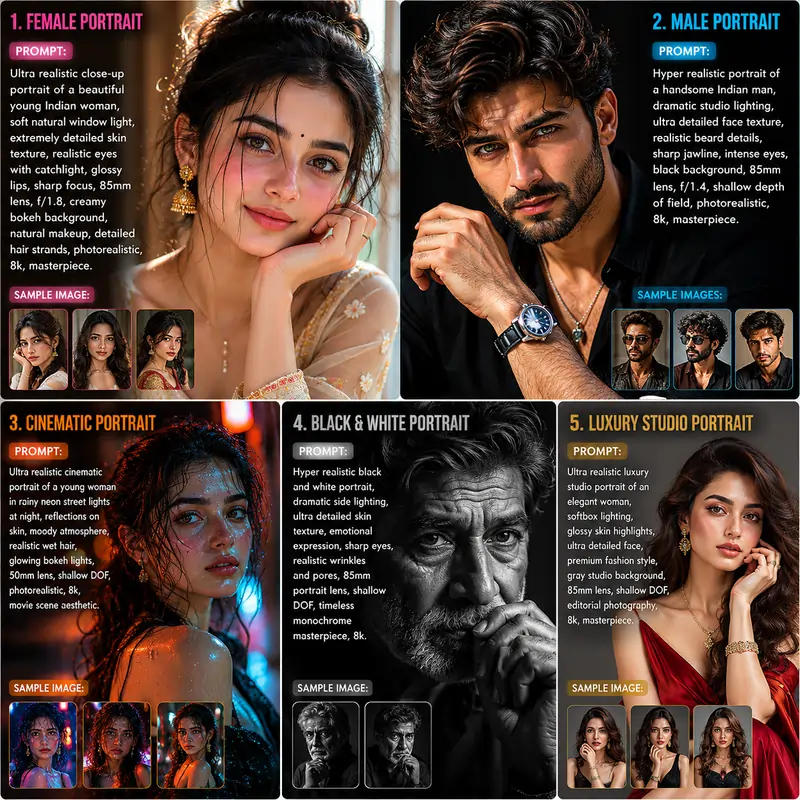
Over the next few sections, we will explore five specific configurations. These aren't just random keywords; they are battle-tested combinations designed to bypass the AI's tendency to simplify images. You will learn how to shift from "cartoonish" to "gallery-quality" by adjusting just a few key parameters.
1. Hyper Realistic Portrait (Female)
This prompt is designed to simulate natural window lighting, which provides a soft, flattering glow. The focus is incredibly sharp on the eyes and lips while maintaining a creamy background blur.
Ultra realistic close-up portrait of a beautiful young Indian woman, soft natural window light falling on the face, extremely detailed skin texture, visible pores, realistic eyes with catchlight, glossy lips, sharp focus, cinematic composition, shallow depth of field, DSLR photography, 85mm lens, f/1.8, creamy bokeh background, natural makeup, detailed hair strands, photorealistic, ultra HD, RAW photo quality, warm skin tones, professional color grading, realistic shadows, high dynamic range, editorial fashion photography, masterpiece, 8k, hyper detailed, realistic facial expression
2. Hyper Realistic Portrait (Male)
Male portraits often benefit from harsher, more dramatic lighting to emphasize bone structure and facial hair details. This setup simulates a high-end studio environment.
Hyper realistic portrait of a handsome Indian man standing in dramatic studio lighting, ultra detailed face texture, realistic beard details, sharp jawline, intense eyes, black background, cinematic shadows, DSLR quality, 85mm lens, f/1.4, shallow depth of field, ultra sharp focus, realistic skin pores, natural color tones, editorial photography style, ultra HD, RAW image, photorealistic lighting, professional portrait photography, masterpiece, 8k, high contrast, realistic hair texture
3. Cinematic Atmosphere Portrait
If you want a moody, movie-like aesthetic, you need environmental interaction. This prompt introduces wet skin, neon reflections, and background bokeh lights for a stunning visual narrative.
Ultra realistic cinematic portrait of a young person standing in rainy neon street lights at night, reflections on skin, moody atmosphere, realistic wet hair, glowing bokeh lights in background, extremely detailed eyes, cinematic color grading, shallow depth of field, DSLR camera look, 50mm lens, ultra sharp focus, photorealistic skin texture, realistic shadows and highlights, movie scene aesthetic, RAW photography, masterpiece, ultra detailed, 8k realism
4. Black & White Masterpiece
Monochrome photography relies heavily on contrast and texture. Removing color forces the viewer to focus entirely on the emotion and the intricate details of the subject's face.
Hyper realistic black and white portrait photography, dramatic side lighting, ultra detailed skin texture, emotional facial expression, sharp eyes, realistic wrinkles and pores, cinematic shadows, professional studio setup, DSLR quality, 85mm portrait lens, shallow depth of field, timeless photography style, monochrome masterpiece, ultra HD, realistic contrast, photorealistic portrait, gallery quality image
5. Luxury Studio Fashion
Perfect for generating editorial assets, this prompt simulates expensive softbox lighting commonly used in high-end fashion magazines.
Ultra realistic luxury studio portrait of an elegant woman wearing modern fashion clothing, softbox lighting, glossy skin highlights, ultra detailed face, realistic eyes, premium fashion magazine style, gray studio background, sharp focus, DSLR photography, 85mm lens, shallow DOF, ultra realistic textures, cinematic skin tones, high-end editorial photography, RAW image quality, masterpiece, hyper detailed, 8k photorealism
Instructions: Customizing Your Portraits
These templates act as a powerful foundation, but they are fully customizable. If you want to change the ethnicity, simply swap the descriptors. If you want a wider shot showing more of the environment, change the "85mm lens" to a "35mm lens". The core photographic parameters will ensure the realism remains intact regardless of who you decide to generate.
Frequently Asked Questions (FAQ)
Why do my AI portraits look like plastic or cartoons?
This happens when your prompt lacks texture and camera terminology. Adding phrases like "visible pores", "realistic skin texture", and "85mm lens" forces the AI to transition from a digital art style to photorealism.
Which AI generator is best for realistic faces?
Midjourney V6 is currently the industry leader for generating hyper-realistic skin textures and cinematic lighting.
Can I change the ethnicity or clothing in these templates?
Absolutely. These templates act as a strong foundation. You can easily swap character descriptions or add specific clothing without losing the realistic camera effects.