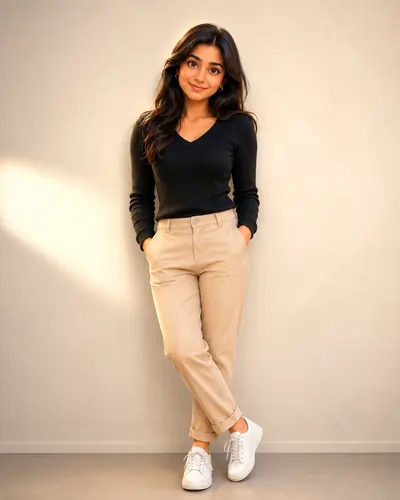
The Real Struggle with 3D AI Portraits
Ever tried turning a real photo into a 3D cartoon and ended up looking like a completely different person? Yeah, me too. It is incredibly frustrating. We all see those stunning, Pixar-quality avatars floating around on Instagram and think, "I want my profile picture to look exactly like that." But when you actually upload your favorite selfie into an AI tool and simply ask it to "make me a 3D character," the result is almost always a disaster. You might get a beautiful image back, but your jawline is entirely wrong, your nose has been replaced with a generic button nose, and you look like a stranger.
I spent months struggling with this exact problem. I wanted the rich, clay-render aesthetics of a high-end animation studio without losing the very features that made the photo *mine*. If you are tired of AI giving you digital plastic surgery, you are in the right place. The key to fixing this isn't just about tweaking your image; it's about learning how to aggressively constrain the AI's creative freedom.
By the way, if you are looking for a slightly different, more flat-art vibe, you might want to check out our Semi-Cartoon Vector Illustration guide or explore some of our Colorful Vector Character Portrait (Hindi) templates for unique 2D alternatives.
Why Identity Preservation Fails (And How to Fix It)
Generative models like Midjourney and DALL-E have a fundamental flaw when it comes to personal portraits: they are trained on idealized, generic beauty standards. When you give them creative freedom, they will always default to what they consider "perfect" 3D proportions rather than your actual face. They don't understand that your slightly asymmetrical smile or specific eye shape is what makes you recognizable.
To combat this, we have to use what I call "authoritative prompting." You cannot just describe what you want to see; you must violently forbid the AI from changing what is already there. This is where most casual users fail. Our framework works because it acts as a digital fence, commanding the machine to preserve the exact facial structure while only applying the 3D textures and lighting to the surface level.
Brainstorming with Text Models
Before jumping into a heavy rendering engine like Midjourney, it helps to plan your vocabulary. Sometimes, I use a quick chatgpt prompt just to gather a list of professional 3D rendering terms (like 'global illumination' or 'ambient occlusion'). Having the right words is half the battle.
If you are struggling to define the exact mood or background for your character, you can use a gemini prompt generator workflow to brainstorm different environments. For instance, asking it to describe a "cyberpunk neon alleyway in 3D" gives you the exact descriptive tags you need to copy and paste into your final image prompt. And remember, if the final render comes out slightly dark, you can always rely on google gemini ai photo editing prompts to figure out how to adjust the curves and color grading in Photoshop later.
Breaking Down the Prompt Framework
The extensive prompt I have provided below is meticulously crafted to balance identity with artistic flair. Here is exactly why it works:
- The Anchor Phase: We start by explicitly stating, "Do not alter or replace any facial features, clothing details, jewelry..." This is crucial. It tells the AI that the source image's geometry is locked.
- The Aesthetic Injection: By demanding a "Pixar-quality realism, soft clay render finish," we force the engine to drop the photorealistic skin textures and replace them with that highly sought-after, smooth 3D animation studio look.
- Studio Lighting Setup: A 3D render without good lighting looks flat and cheap. Specifying a "Warm rim light behind the subject" creates depth, making your character pop out from the background seamlessly.
Aspect Ratios Matter
We are using --ar 4:5 in this prompt because it is universally the best size for mobile devices and Instagram. If you are generating a banner or desktop wallpaper, do not forget to change that tag to --ar 16:9 before you hit generate!
The Ultimate 3D Cartoon Portrait Prompt
Upload a clear, front-facing photo of yourself into your AI engine (Midjourney is highly recommended for this). Copy the URL of your uploaded image, type `/imagine`, paste your image URL, hit space, and then paste the entire text block below.
Transform the uploaded photo into an ultra-premium 3D cartoon portrait while preserving the subject's exact identity, facial structure, hairstyle, outfit, accessories, pose, expression, and skin tone with maximum accuracy. Do not alter or replace any facial features, clothing details, jewelry, hairstyle, beard, mustache, makeup, or body posture. Maintain the original eyebrows, eyes, nose shape, lips, jawline, facial hair, ears, and overall bone structure exactly as shown in the reference image. The character should be instantly recognizable as the same person. Create a high-end stylized 3D animated look with slightly enhanced proportions, featuring larger expressive eyes, smoother facial contours, and charming cartoon aesthetics while keeping the original emotion and expression perfectly intact. Whether smiling, laughing, serious, or candid, preserve the exact emotional feeling from the source photo. Use realistic skin textures with subtle pores, natural shading, and fine facial hair details for authenticity. Keep all clothing fabrics, patterns, colors, embroidery, and accessories identical to the original image. Apply cinematic studio lighting: * Soft key light from the left * Gentle fill light from the right * Warm rim light behind the subject for depth and separation Background should be clean, elegant, and distraction-free with a soft blurred gradient, premium studio backdrop, or subtle bokeh effect that enhances focus on the character. Rendering Style: Ultra-detailed 3D character design, Pixar-quality realism, Disney-inspired facial appeal, Illumination-style charm, soft clay render finish, global illumination, ray-traced lighting, cinematic depth of field, highly detailed textures, professional color grading, 8K quality, masterpiece, award-winning character art. Important: Preserve the person's exact identity, face, hairstyle, clothing, accessories, pose, gesture, and expression. No face swapping, no outfit changes, no additional accessories, no age modification. --ar 4:5
Frequently Asked Questions
Why does my 3D cartoon portrait look like a completely different person?
This usually happens when the image weight parameter is too low, or the prompt lacks strict negative constraints. The AI naturally gravitates toward generic attractive faces. Using our highly specific identity preservation phrases forces the AI to prioritize the source image over its default aesthetic.
Which AI generator works best for this specific 3D prompt?
Midjourney v6 is currently the absolute best engine for translating this specific prompt, as it natively understands cinematic lighting and 3D rendering textures like 'clay render' and 'global illumination'. DALL-E 3 can also produce great results but may lean slightly more towards 2D illustration.
How do I use an image prompt in Midjourney with this text?
Upload your reference photo into the Midjourney Discord chat, press enter, click the image, and copy its link. Then type '/imagine', paste the image link, hit the spacebar, and paste our text prompt immediately after the link.
Can I change the aspect ratio from 4:5 to 16:9?
Yes. The 4:5 ratio is optimized for Instagram and mobile screens. If you need a cinematic desktop wallpaper or YouTube thumbnail, simply change '--ar 4:5' at the end of the prompt to '--ar 16:9'.
What if the AI changes my clothing or jewelry?
If the AI ignores the 'keep accessories identical' command, you can use the 'Vary (Region)' tool in Midjourney, or use inpainting in tools like Stable Diffusion, to mask the clothing and force the AI to redraw it strictly from the original image.
How can I adjust the background color in the prompt?
Locate the sentence 'Background should be clean, elegant, and distraction-free...' and modify it. For example, change it to 'Background should be a vibrant neon cyberpunk city' or 'a solid pastel pink studio backdrop'.
Is it possible to add new accessories using this exact framework?
While this specific framework is strictly designed for 100% identity and outfit preservation, you can carefully remove the 'no additional accessories' line from the negative constraints and manually add a phrase like 'wearing stylish sunglasses' into the main text body.