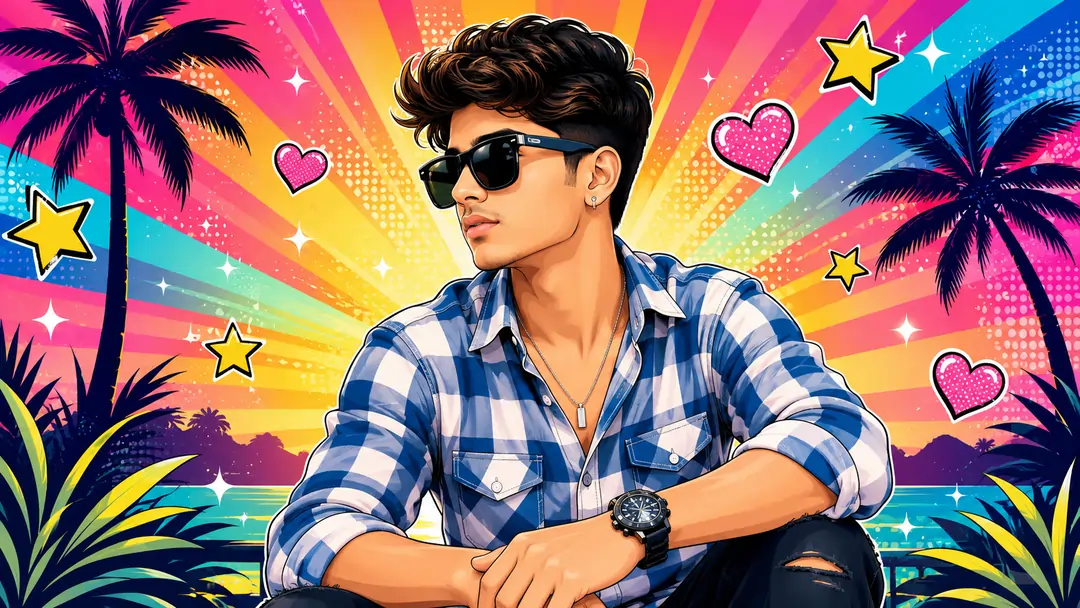
The Rise of Semi-Cartoon Digital Art
In the expansive world of digital artistry, the demand for vibrant, stylized aesthetics has skyrocketed. Creators, brands, and digital marketers constantly seek visual assets that grab attention in crowded social media feeds. The semi-cartoon vector style—often characterized by flat shading, saturated palettes, and clean line work—offers a perfect balance. It retains the recognizable identity of a photograph while injecting the playful, energetic vibe of a modern pop-art poster. Historically, transforming a standard portrait into a polished vector graphic required immense technical skill in vector-based software, manually tracing facial contours, and painstakingly applying gradient meshes.
Today, advanced generative engines allow us to accomplish this transformation in mere seconds. However, transitioning from a photorealistic base image to a clean illustration presents a unique challenge for artificial intelligence. By default, image generation models are heavily biased toward photorealism. Without strict, engineered constraints, the AI will naturally attempt to render highly detailed skin pores, realistic hair strands, and complex lighting shadows—completely ruining the intended pop-art effect.
Why Standard Stylization Prompts Fail
If you have ever attempted to instruct an AI engine to simply "turn this picture into a cartoon," you have likely experienced inconsistent, unpredictable results. The engine might produce a 3D animated character, a messy watercolor sketch, or a hyper-realistic image with slightly exaggerated colors. The ambiguity of the word "cartoon" leaves too much creative interpretation up to the machine.
To establish a reliable framework, we must break down the exact visual components of vector art. Often, I rely on a chatgpt prompt during the conceptualization phase to help brainstorm the specific environmental elements—such as deciding between a cyberpunk neon background or a cheerful tropical setting. Next, using a dedicated gemini prompt generator allows for structuring the precise syntax required by rendering engines like Midjourney. This dual-tool approach ensures that every descriptive tag, from "colorful radial rays" to "subtle light particles," serves a distinct visual purpose.
Deconstructing the Vector Framework
Our engineered framework focuses on three crucial pillars of image generation: subject preservation, stylistic overrides, and atmospheric enhancement. Let us analyze the mechanics of the prompt below:
- Subject Preservation: "Keep the same pose, outfit, facial features, and accessories." When using an image prompt, this instruction forces the algorithm to anchor its rendering process to your original source file, preventing unwanted alterations to your identity.
- Stylistic Overrides: "Smooth, clean lines, soft gradients... Skin should be smooth and illustrated, not realistic." These negative and positive constraints are the core of the framework. They explicitly forbid the engine from rendering photorealistic textures, ensuring a true semi-cartoon finish.
- Atmospheric Enhancement: "Pop-art tropical scene with palm trees, colorful radial rays, sparkles... cheerful, energetic mood." A stylized character requires an equally stylized environment. These detailed background tags unify the composition into a cohesive, high-quality digital illustration.
Post-Generation Workflow
Even with a perfect prompt, the final output might require slight adjustments to achieve absolute perfection. If the colors feel slightly muted or if there are minor artifacts in the background, executing specific google gemini ai photo editing prompts can guide you through post-processing techniques in software like Photoshop. Adjusting the vibrancy and cleaning up vector curves manually ensures a commercial-grade final product.
The Professional Vector Illustration Prompt
Below is the complete, tested AI framework. For optimal results, ensure you upload a clear, well-lit photograph as your base image reference before applying the text parameters.
Turn this photo into a vibrant vector-style illustration. Keep the same pose, outfit, facial features, and accessories. Use smooth, clean lines, soft gradients, and a polished semi-cartoon look. Enhance colors with bright, saturated tones. Stylize the background into a pop-art tropical scene with palm trees, colorful radial rays, sparkles, and comic-style stars and cute pink hearts. Add a cheerful, energetic mood with glowing highlight and subtle light particles. Skin should be smooth and illustrated, not realistic. Overall style should feel like a modern pop-art poster or high-quality digital illustration.
Frequently Asked Questions (FAQ)
How do I maintain my original facial features in the vector style?
The key is using an image reference parameter in your chosen engine alongside the explicit phrase 'Keep the same pose, outfit, facial features, and accessories.' You can also use a lower stylize value to prioritize your original image over the AI's creative freedom.
Why does my illustration look too realistic instead of cartoonish?
Generative AI engines naturally lean toward photorealism. You must explicitly instruct the engine with phrases like 'Skin should be smooth and illustrated, not realistic' and 'clean lines, soft gradients' to successfully override its default realistic rendering parameters.
Can I change the background to something other than a tropical scene?
Absolutely. Simply replace the 'tropical scene with palm trees' section of the prompt with your desired environment, such as a 'cyberpunk cityscape' or a 'minimalist pastel studio,' while keeping the rest of the styling and shading parameters intact for a consistent vector look.