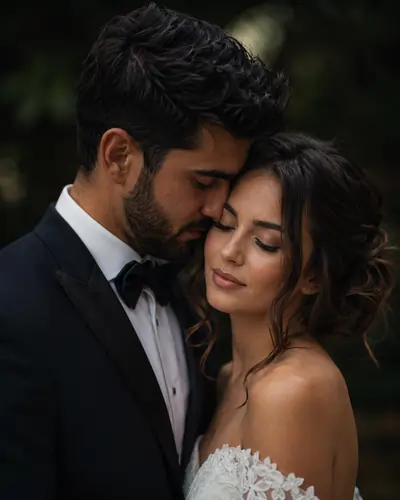
Capturing Real Emotion with AI Photography
Let's be honest, getting the perfect wedding shot used to mean renting expensive lenses, chasing the golden hour, and hoping the couple felt comfortable in front of the camera. But as a video editor and digital creator, I've seen firsthand how AI is changing the game. Today, you don't need a heavy DSLR to generate a breathtaking, emotional wedding portrait—you just need the right words.
If you've ever tried generating romantic images, you know that a basic chatgpt prompt often gives you something that looks a bit too plastic or cartoonish. The secret to getting that high-end, editorial look lies in how you structure your instructions. You have to tell the AI exactly what kind of lighting, texture, and mood you want.
That is why I put together this specific emotional wedding prompt. I've tweaked the parameters to ensure the AI focuses on the raw chemistry between the couple rather than getting distracted by the background. Whether you are using Midjourney, or experimenting with advanced Gemini AI prompts for image generation, this text block will give you that cinematic feel instantly.
Emotional close-up wedding portrait of a couple, soft dramatic lighting, intimate atmosphere, cinematic storytelling, ultra-realistic skin texture, high-end wedding photo
Why This Specific Prompt Works Wonders
When you are pasting text into a tool, every single word carries weight. Sometimes I use a standard gemini prompt generator to get a baseline idea, but for weddings, you really need a human touch in the text. Let's break down why this close-up couple portrait instruction works so well:
- "Emotional close-up": By framing the shot tightly, we force the AI to concentrate on facial expressions. This creates an immediate connection with whoever is looking at the photo.
- "Soft dramatic lighting": This is a classic trick in cinematic couple art. Instead of harsh, bright flashes, this tells the engine to use moody shadows that highlight the cheekbones and add a romantic depth.
- "Intimate atmosphere & cinematic storytelling": These words give the AI a narrative. It stops rendering just "two people" and starts rendering a moment that feels like a still frame from a romantic movie.
- "Ultra-realistic skin texture": This is the most important part! To avoid that fake, AI-generated look, we explicitly ask for an realistic skin texture AI rendering. This ensures you see natural pores and subtle, lifelike details.
Instructions: How to Customize This Prompt
The best part about AI wedding photography is that you can easily tweak the scene to match your exact vision. Here are a few ways I usually customize this prompt for different projects:
Step 1: Change the Cultural Context
If you are working on a project that needs a specific cultural vibe, just add it right after "portrait of a". For example: "Emotional close-up wedding portrait of an elegant Indian couple wearing traditional attire..."
Step 2: Play with the Lighting
"Soft dramatic lighting" is great for a moody look, but if you want something brighter, swap it out. I often use "golden hour sunlight" or "soft fairy light bokeh" for a warmer, more joyful AI couple portrait.
Step 3: Fix Your Aspect Ratio
If you're generating this for Instagram, a square or vertical format is best. If you're using Midjourney, just type --ar 4:5 at the end of the prompt. For YouTube thumbnails or desktop wallpapers, use --ar 16:9.
Bringing Your Creative Vision to Life
I genuinely believe that knowing how to communicate with AI is the best skill a creator can have right now. You don't have to be a tech wizard to use these AI image editing prompts; you just need to know what you want to see. This high-end wedding prompt is a great starting point, but don't be afraid to experiment with it.
Change the background, adjust the clothing colors, and see what happens. The AI is your canvas, and the prompt is your brush. Go ahead and start generating!
Frequently Asked Questions (FAQ)
Which AI tool works best for this emotional wedding prompt?
This prompt is highly optimized for Midjourney V6 because it handles skin textures incredibly well. However, it also yields beautiful, highly detailed results if you are using DALL-E 3 or other advanced models.
Can I change the lighting style in the prompt?
Absolutely. You can effortlessly swap "soft dramatic lighting" with phrases like "golden hour lighting", "soft candlelight", or "studio lighting" depending on the specific mood you want to portray.
How can I make the couple look like a specific ethnicity?
Simply inject descriptive modifiers right at the beginning of the prompt. For example, you can write, "Emotional close-up wedding portrait of a South Asian couple" to tailor the final output to your precise requirements.