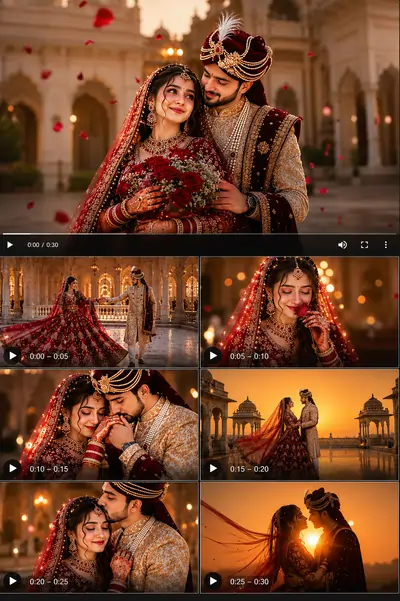
The Magic of AI in Wedding Videography
The wedding industry is undergoing a massive visual revolution. Planners, photographers, and couples are constantly looking for ways to visualize grand concepts before the actual big day. While generating static images of wedding setups has become relatively common, generating high-quality, temporally consistent video clips of a Royal Indian Wedding is considered one of the toughest challenges in generative AI today.
Why is it so difficult? Indian weddings are inherently complex. They feature highly intricate jewelry, heavy fabrics like lehengas and dupattas that respond to wind in very specific ways, and majestic architectural backgrounds. When you ask an AI video generator to render these elements in motion, the physics engine often breaks down, resulting in warped faces or melting fabrics. To solve this, you need a highly engineered text structure that commands the AI to respect real-world physics and cinematic lighting.
This is where our advanced template comes in. We have designed a master instruction set that forces the AI engine to act like a professional Bollywood cinematographer.
Why Basic Prompts Fail for Grand Events
If you use a generic chatgpt prompt to simply describe "an Indian couple getting married," the output will likely lack depth, emotion, and realism. The AI will guess the lighting, guess the camera angle, and usually default to a very generic, sometimes cartoonish, aesthetic.
Many creators use a gemini prompt generator to brainstorm their initial mood boards and cultural details. While this is a fantastic starting point for ideas, generating video requires you to translate those ideas into technical camera terminology. You must explicitly define parameters like the lens size, the frames per second (FPS), and the exact camera movement (like a Dolly-In). Without these guardrails, the AI has too much creative freedom, which leads to unpredictable and often unusable footage.
Pro Tip: The Image-to-Video Workflow
For the absolute best results, do not generate video directly from text. First, use our base text in an image generator. Many professionals look for specific google gemini ai photo editing prompts to refine their static base image until the couple looks perfect. Once the image is locked, upload that static picture into a video generator (like Runway Gen-3 or Luma) along with the video settings below to bring it to life without losing facial consistency.
The Ultimate Royal Indian Wedding Prompt
Below is the complete, battle-tested syntax for generating a breathtaking 4K cinematic wedding clip. Pay close attention to the Negative Prompt and Settings, as they are just as important as the main description.
Prompt:
A royal Indian wedding couple standing gracefully together inside a majestic heritage palace courtyard during golden sunset hour, wearing luxurious deep red bridal lehenga with intricate gold embroidery and an elegant embroidered sherwani with royal turban, highly detailed traditional jewelry sparkling naturally, emotional romantic expressions, soft wind gently flowing the dupatta and fabric, warm cinematic golden sunlight illuminating their faces, ultra realistic Bollywood wedding atmosphere, grand palace architecture with marble textures, royal arches and vintage heritage details in background, shallow depth of field, dreamy bokeh lights, smooth cinematic camera movement, slow motion feeling, volumetric sunlight rays, realistic skin texture, realistic fabric physics, natural body posture, luxury wedding film aesthetic, cinematic shadows, HDR, hyper detailed, 85mm lens look, professional Bollywood cinematography, soft ambient particles in air, rich warm color grading, emotionally immersive atmosphere, ultra realistic cinematic video, 4K ultra quality, highly detailed facial features, realistic eye reflections, smooth motion blur, premium wedding reel style
Negative Prompt:
cartoon, anime, low quality, blurry face, extra fingers, distorted body, duplicate people, bad anatomy, low resolution, oversaturated colors, unrealistic skin, flickering, unstable motion, ugly face, deformed hands, noisy background, artificial lighting, stiff pose, CGI look
Settings:
Aspect Ratio: 9:16 | Style: Cinematic | FPS: 24fps | Camera: Slow Dolly-In + Soft Orbit Movement | Motion Strength: Medium | Quality: 4K HDR
Step-by-Step Instructions: How to Use This Template
To get the most out of this template, follow these exact steps when inputting the data into your AI video engine:
- Set the Aspect Ratio: We have set the aspect ratio to
9:16. This vertical format is specifically optimized for Instagram Reels, YouTube Shorts, and TikTok, making it perfect for modern wedding teasers. - Apply the Negative Prompts: Never skip the negative prompt section. Words like "CGI look" and "flickering" act as safety nets, preventing the AI engine from generating unnatural, plastic-looking skin or unstable body movements.
- Control the Camera: In the settings, we specified "Slow Dolly-In + Soft Orbit Movement". If your video tool has camera control sliders (like Runway Gen-3), make sure to set the Pan to 0, and slightly increase the Zoom and Orbit values to match this exact cinematic feel.
By treating the AI like a high-end film crew rather than a magical graphic designer, you can consistently generate luxurious, emotionally resonant wedding visuals that capture the true grandeur of the occasion.
Frequently Asked Questions (FAQ)
How do I make the bridal lehenga and jewelry look realistic in AI videos?
The key is using specific textile and lighting descriptors in your prompt. Terms like "intricate gold embroidery", "volumetric sunlight rays", and "realistic fabric physics" force the AI to render high-fidelity details instead of flat colors.
Why does my AI video look like a cartoon?
This usually happens when you forget to include a strong Negative Prompt. You must explicitly tell the AI to avoid "cartoon, anime, CGI look, and artificial lighting" while ensuring you use photography terms like "85mm lens" in the main prompt.
Can I use this prompt to generate 9:16 Instagram Reels?
Yes, absolutely! The settings included in this template specifically define an Aspect Ratio of 9:16, making the generated video perfectly optimized for Instagram Reels, YouTube Shorts, and TikTok.